| Cash Register Help SAM4s Cash Registers, Sharp Cash Registers, Casio Cash Registers The Site that offers FREE cash register Support and Programming |
| FREE support for SAM4s Cash Registers including free programming tips when we can. Many people program their SAM4s Cash Register by themselves as they are a pretty easy cash register to program. If you are not comfortable programming a cash register then you should hire a pro from a cash register dealership we have links to |
|
| SAM4s ER-285M Cash Register Programming |
As of June 2010 The SAM4s ER-285M is a current model. Here are
several dealers that sell the ER-285M Cash Register Nationwide
Source #1 SAM4s ER-285M Cash Register
Source #2 SAM4s ER-285M Cash Register
several dealers that sell the ER-285M Cash Register Nationwide
Source #1 SAM4s ER-285M Cash Register
Source #2 SAM4s ER-285M Cash Register
SAM4s ER-285M Cash Register Tax Programming
The SAM4s ER-285M has the capability to support four separate taxes. Taxes can be calculated as either a straight
percentage rate of between .001% and 99.999%, or a 60 break point tax table. Each tax may be either an add-on
tax (added to the cost of a taxable item), or a value added tax (VAT) that is included in the price of the item. The
following flow chart is a guide for changing the tax on the SAM4s ER-285M Cash Register
The SAM4s ER-285M has the capability to support four separate taxes. Taxes can be calculated as either a straight
percentage rate of between .001% and 99.999%, or a 60 break point tax table. Each tax may be either an add-on
tax (added to the cost of a taxable item), or a value added tax (VAT) that is included in the price of the item. The
following flow chart is a guide for changing the tax on the SAM4s ER-285M Cash Register
SAM4s ER-285M Cash Register PLU Status Programming
All PLUs, whether they are registered by pressing a PLU key on the keyboard, or by entering the PLU number and
pressing the PLU key, have the same programming options. These options are set through separate programs:
All PLUs, whether they are registered by pressing a PLU key on the keyboard, or by entering the PLU number and
pressing the PLU key, have the same programming options. These options are set through separate programs:
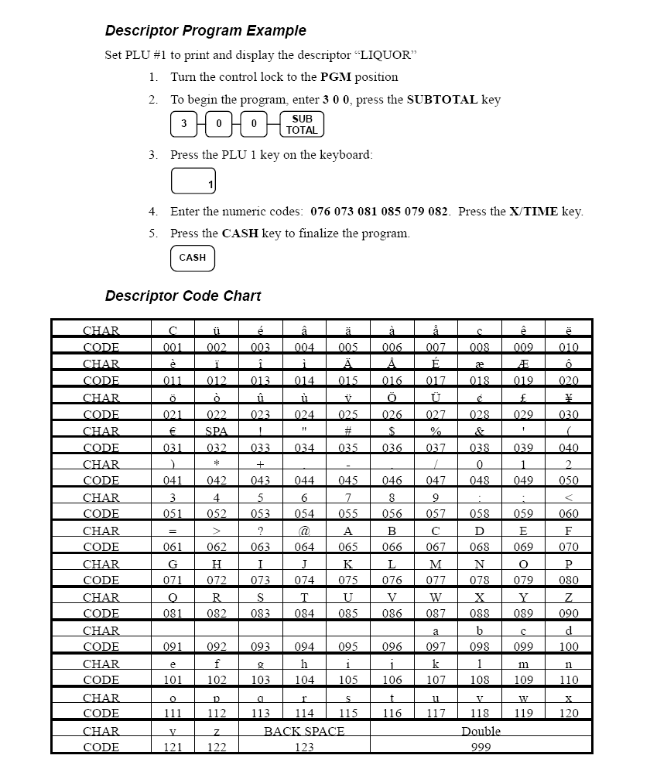
SAM4s ER-285M PLU Descriptor Programming
Each PLU can have an Alpha Numeric Descriptor (name) programmed. Use the following guide to program names in
each PLU on the SAM4s ER-285M Cash Register
Each PLU can have an Alpha Numeric Descriptor (name) programmed. Use the following guide to program names in
each PLU on the SAM4s ER-285M Cash Register
There is of course more programming to be done on the SAM4s ER-285M however we listed the basics. The entire
manual can be found here SAM4s ER-285M Manual or The Cash Register Guys have it posted here Free SAM4s
Cash Register Manual Downloads
manual can be found here SAM4s ER-285M Manual or The Cash Register Guys have it posted here Free SAM4s
Cash Register Manual Downloads
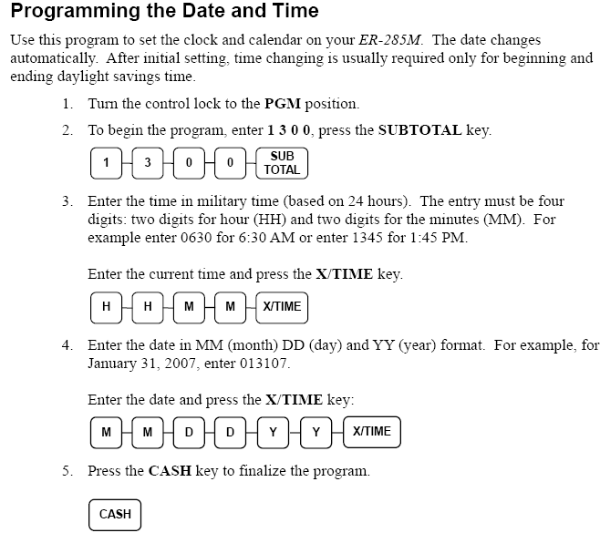
SAM4s ER-285M Cash Register Date and Time Programming
The following flow chart is a guide for changing the date and time for the SAM4s ER-285M Cash
Register.
The following flow chart is a guide for changing the date and time for the SAM4s ER-285M Cash
Register.


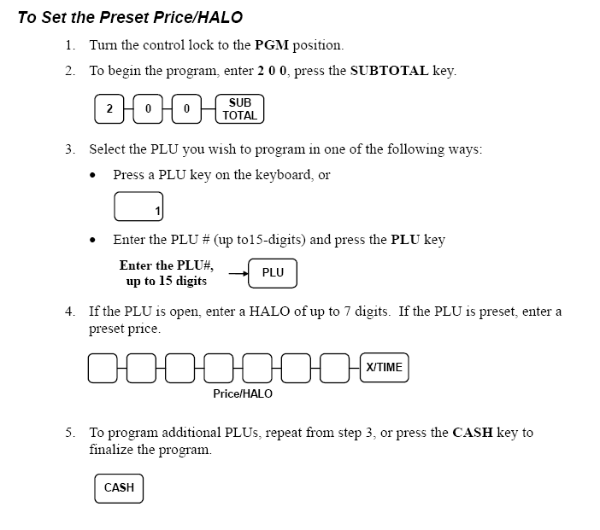
| SAM4s ER-285M Cash Register PLU Pre-Set Pricing Programming Follow the guide below to set a PLU price on the SAM4s ER-285M Cash Register |